


Automation Ecosystem of Business Information Flow
Scheduled Automations That Keep Working Even When Nobody Is in Front of the Computer
Many business activities follow repetitive patterns.
Updating databases, generating reports, synchronizing information, sending notifications, creating PDF documents or distributing data across different departments are tasks that are often performed manually, consuming valuable time and increasing the risk of errors.
When these activities must be repeated every day, every week or multiple times throughout the day, automation becomes one of the most powerful drivers of operational efficiency.
For this reason, a complete automation ecosystem was developed based on Windows Task Scheduler, Excel VBA, SharePoint and VBScript scripts, capable of executing operational tasks autonomously without requiring user intervention.
Background Automations
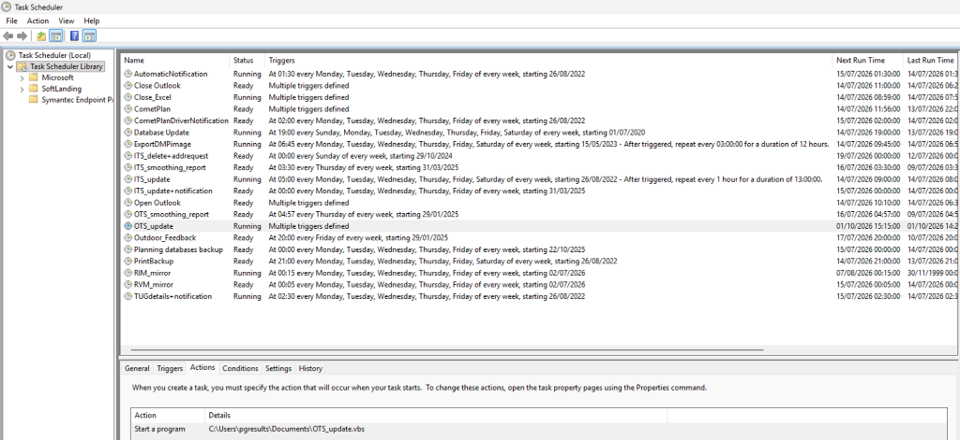
At the core of the solution is Windows Task Scheduler, the Windows component that allows applications and scripts to be executed automatically according to predefined schedules.
Using this infrastructure, tasks can be configured to run:
- at specific times;
- multiple times per day;
- daily;
- weekly;
- monthly;
- or in response to specific events.
Once configured, the system operates autonomously, executing activities during the night, weekends or whenever no user is logged on.
The objective is to eliminate repetitive operations and ensure that processes are executed consistently, accurately and on time.
From Task Scheduler to Excel
Each scheduled task executes a dedicated VBScript.
The script performs a simple but highly effective function: it automatically opens an Excel workbook, launches a specific VBA procedure and closes the application once processing has been completed.
Through this mechanism, Excel becomes a true application platform capable of operating without any user interaction.
Automated procedures can:
- update databases;
- synchronize data;
- generate reports;
- create PDF documentation;
- send notifications;
- calculate KPIs;
- publish results to SharePoint;
- perform scheduled validations and checks.
The entire workflow is managed automatically according to predefined schedules.
An Ecosystem of Automated Processes
Over time, the solution has evolved into a complete ecosystem supporting numerous operational activities.
Examples include:
- automatic updates of planning databases;
- periodic generation of KPI dashboards;
- automatic notifications to users;
- data synchronization between different platforms;
- PDF report generation;
- scheduled backups;
- operational activity monitoring;
- publishing information to SharePoint.
Each automation works independently while remaining fully integrated within the same digital ecosystem.
A Practical Example: Automated Tire Order Management
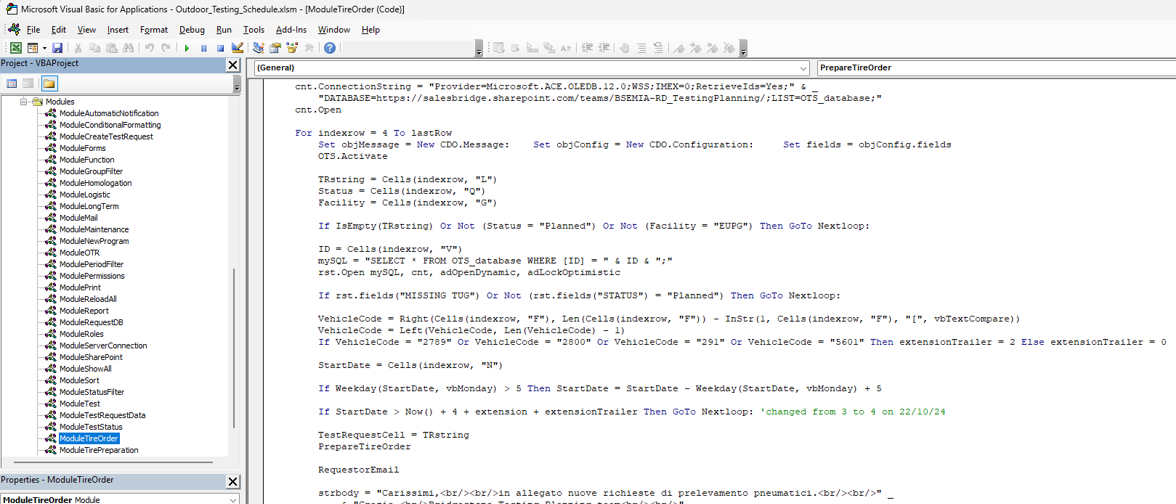
One of the automated workflows developed within the system focuses on tire withdrawal requests.
Using a dedicated VBA procedure, the platform automatically analyzes planned activities, verifies data availability and retrieves information from SharePoint and external systems.
The automation can:
- identify activities requiring tire availability;
- retrieve test request information;
- validate technical references and availability;
- automatically complete withdrawal forms;
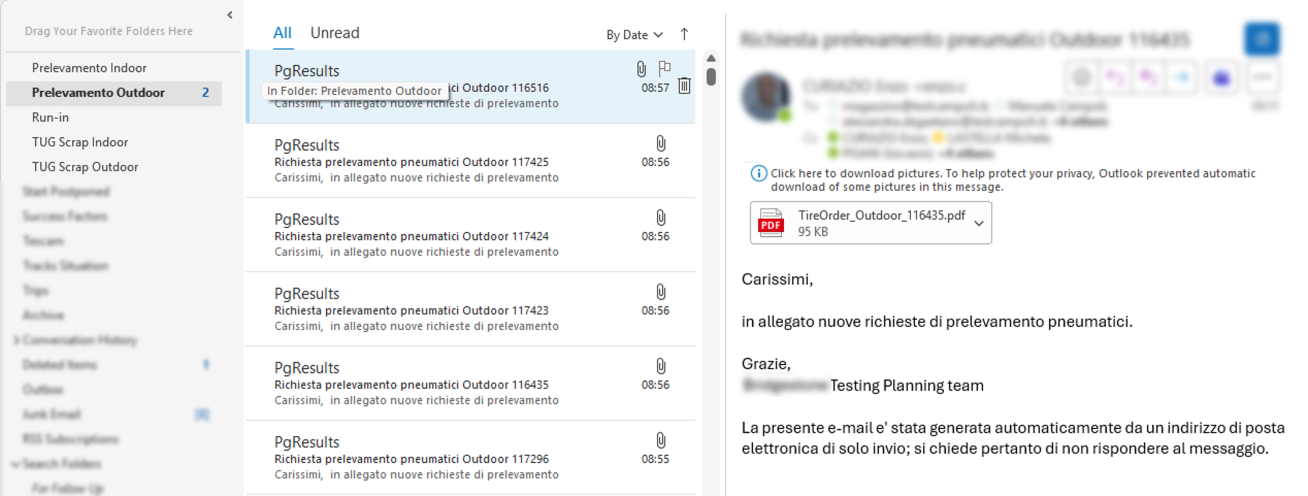
- generate PDF documentation;
- archive generated documents;
- send e-mail notifications to all stakeholders involved;
- update activity status within the database.
The entire process takes place without manual intervention.
Operations that would normally require multiple manual steps are executed automatically by the system.
SharePoint Integration
One of the most important aspects of the architecture is its integration with SharePoint.
Automations can read and update information stored in SharePoint Lists, access documents archived in company libraries and automatically publish the results of processing activities.
This provides a centralized and shared data repository while maintaining the flexibility and customization typically associated with Excel-based solutions.
Information becomes immediately available to authorized users without requiring manual distribution activities.
Automated Notifications and Management by Exception
Another highly effective area of automation is the generation of automatic notifications.
Scheduled procedures periodically monitor the status of activities and, whenever necessary, send targeted communications to the appropriate users.
Notifications can be used to:
- remind users of upcoming deadlines;
- alert teams about delayed activities;
- highlight missing information;
- announce the availability of new reports;
- request corrective actions.
As a result, people become involved only when intervention is actually required.
The organization moves from a continuous monitoring model to a management-by-exception approach.
The Benefits of Scheduled Automation
The introduction of automated workflows produces immediate and measurable benefits.
Activities are always executed according to the same rules, at the same times, without depending on the availability of a specific user.
This results in:
- reduced repetitive activities;
- increased process reliability;
- elimination of many manual operations;
- lower risk of errors;
- more timely updates;
- higher information quality;
- continuous data availability.
Many operations that once required time, effort and supervision can now be executed automatically during the night or during periods of lower system utilization.
When Automation Becomes an Ecosystem
The true value of this approach emerges when individual automations are connected together.
An update can trigger a synchronization.
A synchronization can generate a report.
A report can feed a dashboard.
A dashboard can generate a notification.
At that point, it is no longer a single task being automated but an entire business process.
This is the evolution that transforms a collection of VBA macros into a true Process Automation Ecosystem.
Conclusions
This solution demonstrates how accessible technologies such as Windows Task Scheduler, VBScript, Excel VBA and SharePoint can be integrated to create fully automated business processes.
Operational activities are executed autonomously, information is updated and distributed automatically, and users can focus on decision-making rather than repetitive administrative tasks.
The result is a platform capable of operating continuously, reliably and at scale, transforming manual daily activities into digital processes that run automatically according to predefined rules and schedules.